
AGREEMENT STORAGE AND EXPIRATION OVERSIGHT
Real Estate Referral Agreement Tracking
Realty Referral Tracker keeps your signed referral agreement connected to its expiration date, receiving agent, fee terms, and closing record. A document in a folder is useful; a document tied to a live referral is easier to follow through.
A PRACTICAL USE CASE
The client is still searching as the agreement nears expiration
A buyer referral is taking longer than expected. You have the signed agreement stored with the record and an expiration date visible in the pipeline. The expiring-soon indicator prompts you to contact the receiving agent and review the agreement before the date passes.
If both parties agree to revised terms, complete that agreement through your normal signing process and retain the relevant document with the referral. Update the tracked date to match the signed terms, then keep the closing and payment evidence with the same file.
A complete agreement file, not just an attachment
Keep the document and the facts you need to act on it in the same place.
Store the signed agreement
On Pro and Team & Office, upload agreements and supporting files to the referral’s document list. View or download the relevant file when a question arises, including after the transaction closes.
Record the key dates and terms
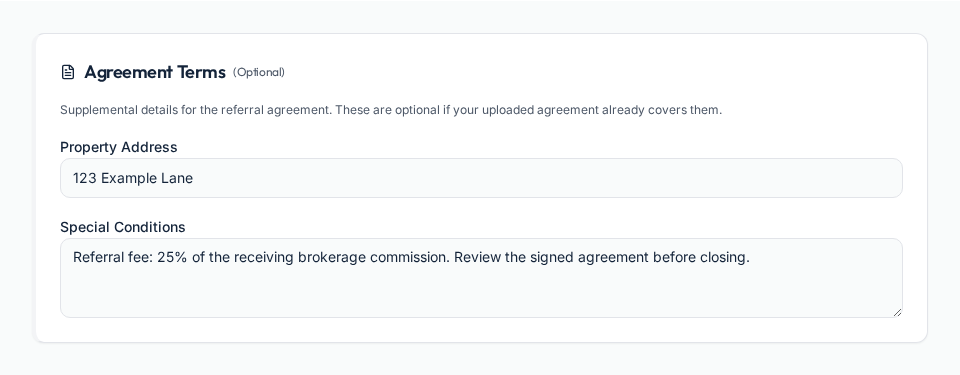
Set the agreement expiration date and negotiated referral fee. Optional Agreement Terms capture a property address and special conditions when additional context is useful.
Share selected documents
Choose which documents to share with the receiving agent through the referral portal and invite. Keep the working record and shared documents connected instead of sending unrelated email attachments.
Connect expiration oversight to the closing record
Tracking a date is a prompt to review your contract, not an automatic contract extension.
Watch for approaching expiration
Expiration alerts and the dashboard’s expiring-soon indicator help the referring agent spot files needing attention. Review the agreement and discuss next steps with the receiving brokerage before changing the tracked date.
Keep the outcome explicit
Use Expired when the agreement has run out, Canceled for a terminated referral, and a paused status when the client’s plans are on hold. The record should reflect what actually happened.
Retain closing and payout evidence
Save final transaction details, closing documents, and the payment record with the referral. Record the check received, brokerage split, and payout dates separately from closing.
Frequently asked questions
Start tracking agreements
Keep your outbound referrals connected with Realty Referral Tracker.
Start tracking agreementsExplore referral tools and workflows
This article is part of The Real Estate Referral Guide, our complete resource on sending, tracking, and getting paid on real estate referrals.
Referral management software
One workflow from signed agreement and handoff through closing and payment.
Referral tracking for brokers
Office oversight, invited agents, centralized billing, and earnings visibility.
Referral follow-up automation
How check-in schedules, quiet-period reminders, and portal updates work together.
Free referral fee calculator
Calculate a referral fee with your own figures or try a worked example.
What is a real estate referral?
How referrals work, who sends them, and the step-by-step process.
Referral fee agreements
Typical percentages, expiration dates, and the clauses that protect your fee.