
AUTOMATED REAL ESTATE REFERRAL FOLLOW-UP
Real Estate Referral Follow-Up Automation
Realty Referral Tracker combines a predictable check-in schedule with a separate reminder for referrals that have gone quiet. Receiving agents answer through a referral-specific portal, keeping updates with the client record instead of scattered across your inbox.
A PRACTICAL USE CASE
A 14-day check-in with a 7-day quiet-period reminder
Suppose the last activity is October 7. The next periodic check-in is October 21. If nothing changes, a 7-day no-update reminder can send on October 14. It fills the gap rather than waiting for the next scheduled check-in.
A sent check-in counts as activity and restarts the quiet-period clock. With both settings at 7 days, a successfully sent check-in prevents the no-update reminder from firing for that same quiet window. The reminder sends once per quiet period, not every day.
Two controls, two different purposes
Choose a regular contact cadence and a separate threshold for silence on each referral.
Periodic Status Check-ins
After you send the Welcome Email, choose a check-in interval of 7, 14, 21, or 30 days. The Email Schedule shows the next email and the last sent date. Automated emails use your saved templates.
No-Update Reminder
Choose how many quiet days to allow before one reminder is sent to the receiving agent and you are notified. A status update, sent check-in, manual update request, or other recorded referral activity restarts the clock.
Know what has actually sent
The no-update card explains the quiet-period rule and displays a reminder-sent date after delivery is recorded for the current window. It does not display an upcoming reminder date as if it were a fixed recurring schedule.
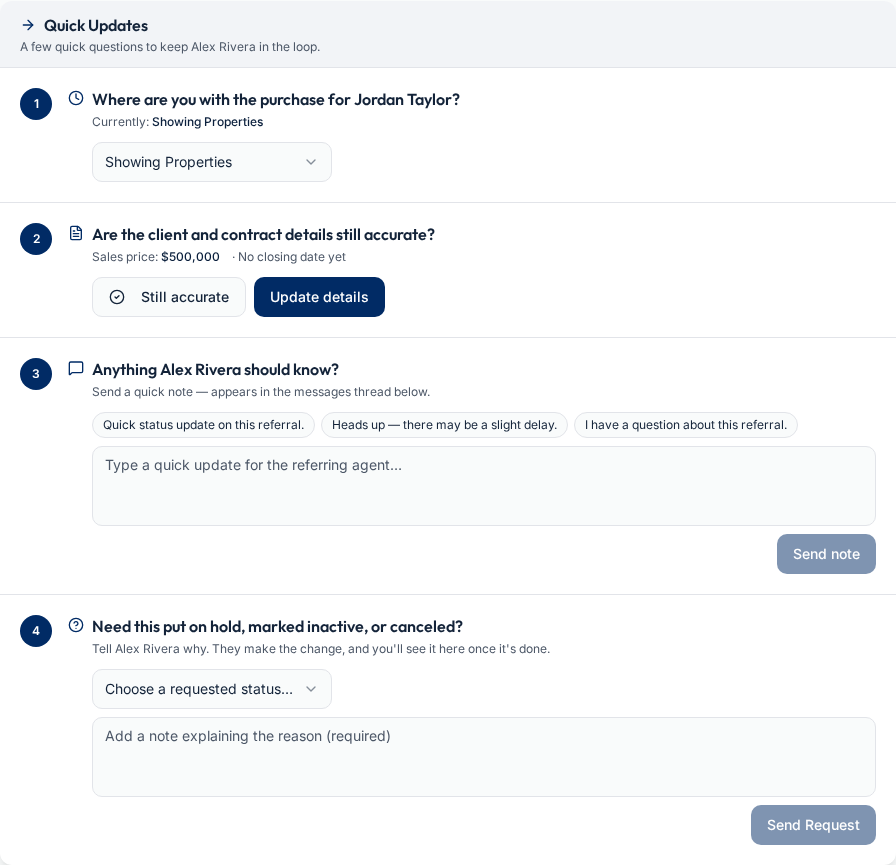
Make the reply easy for the receiving agent
The update request leads directly to a useful action, not a new account registration.
Open the secure portal link
The receiving agent opens the referral-specific link without signing up. Buyer and seller prompts reflect the client’s transaction and current status.
Confirm or change the details
The agent selects a transaction status, confirms or edits client and contract details, adds closing information when needed, and sends a note. Status completion is shown after the update is saved.
Pause when the transaction pauses
Paused and final referrals do not continue automated check-ins or no-update reminders. Receiving agents can request On Hold, Inactive, or Canceled through the portal; the referring agent makes that change.
Frequently asked questions
Set up referral follow-up
Keep your outbound referrals connected with Realty Referral Tracker.
Set up referral follow-upExplore referral tools and workflows
This article is part of The Real Estate Referral Guide, our complete resource on sending, tracking, and getting paid on real estate referrals.
Referral management software
One workflow from signed agreement and handoff through closing and payment.
Referral tracking for brokers
Office oversight, invited agents, centralized billing, and earnings visibility.
Referral agreement tracking
Keep signed documents, expiration dates, and closing records connected.
Free referral fee calculator
Calculate a referral fee with your own figures or try a worked example.
What is a real estate referral?
How referrals work, who sends them, and the step-by-step process.
Referral fee agreements
Typical percentages, expiration dates, and the clauses that protect your fee.