
OUTBOUND REFERRAL WORKFLOW
Real Estate Referral Management Software
Realty Referral Tracker connects the agreement, receiving agent, status updates, closing details, and payment record in one referral file. Follow the opportunity beyond the handoff, all the way to the fee you actually receive.
A PRACTICAL USE CASE
An out-of-area buyer, one complete referral record
You introduce a relocating buyer to another agent. Store the agreement and negotiated fee, send the receiving agent a portal link, and follow the buyer through agency signed, showing properties, and under contract. At closing, replace estimates with the final figures.
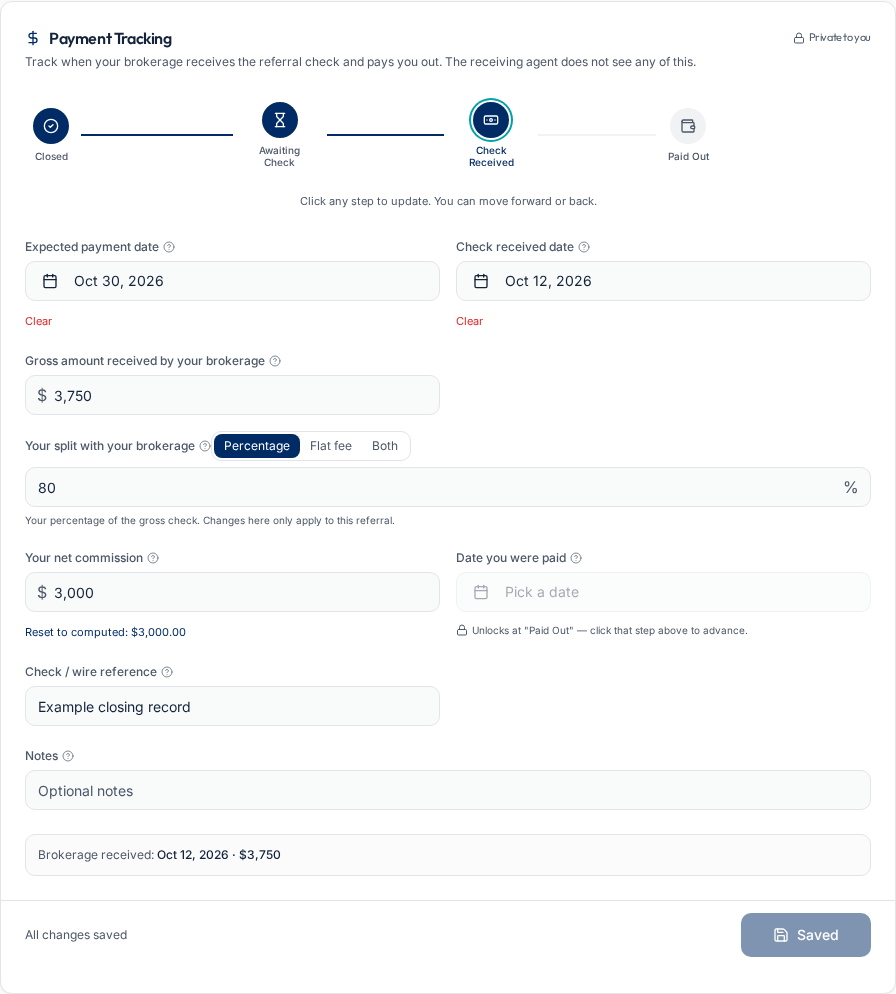
After closing, record when your brokerage receives the check and when you are paid. A closed transaction is not treated as proof that your referral fee has arrived.
From agreement to handoff
Start with the facts that define the referral, rather than leaving the fee terms in a contact note.
Create the referral file
Record the client, transaction type, receiving agent, brokerage, fee terms, and expiration date. Keep optional property details and special conditions alongside the record.
Keep the agreement attached
Upload the signed agreement and supporting documents on Pro or Team & Office. Review the signed document for the actual terms; the tracking record does not replace it.
Introduce the receiving agent
Send the Welcome Email with the referral portal link. The receiving agent can open that link without creating an account, and scheduled follow-up becomes available after the welcome step.
Track the transaction, then track the money
Client progress and commission collection are related, but they are not the same workflow.
Follow buyer or seller milestones
Buyer referrals include agency signed and showing properties. Seller referrals include listing signed. Both progress through under contract and closed, so each record reflects the actual transaction.
Keep updates beside the referral
Receiving agents provide status updates, revised details, notes, and documents through their portal. Use scheduled check-ins when you want a consistent update cadence.
Reconcile the final payment
Record closing details, then use the payment stages: Awaiting Check, Check Received, and Paid Out. Save received amounts, brokerage splits, net commission, dates, and a check or wire reference.
Frequently asked questions
Start managing your referrals
Keep your outbound referrals connected with Realty Referral Tracker.
Start managing your referralsExplore referral tools and workflows
This article is part of The Real Estate Referral Guide, our complete resource on sending, tracking, and getting paid on real estate referrals.
Referral tracking for brokers
Office oversight, invited agents, centralized billing, and earnings visibility.
Referral follow-up automation
How check-in schedules, quiet-period reminders, and portal updates work together.
Referral agreement tracking
Keep signed documents, expiration dates, and closing records connected.
Free referral fee calculator
Calculate a referral fee with your own figures or try a worked example.
What is a real estate referral?
How referrals work, who sends them, and the step-by-step process.
Referral fee agreements
Typical percentages, expiration dates, and the clauses that protect your fee.